independent guide · account · checked 22 October 2026
How to sign up on Roobet and pass Level 2 verification
Access to the casino depends on the law of the reader's country and on the operator's Terms; the chapter on the licence and legal status cites the Terms with the date of reading. The registration window on 22 October 2026 had four fields: username, email, a password of at least 7 characters and an optional referral code, plus an 18+ checkbox and a Play Now button; Google and Metamask serve as alternatives. The Terms allow one account per person, and identity documents can be requested at any time. Play is for adults aged 18 and over; the chapter on deposits follows this one.
Checked on



The registration form
The form opens from the yellow Register button in the header and runs at roobet.com/?modal=auth&tab=register. On 22 October 2026 it asked for a username, an email address and a password; the field for a referral code unfolds on request and is marked optional. A reCAPTCHA check runs in the background, and the button that submits the form reads Play Now.
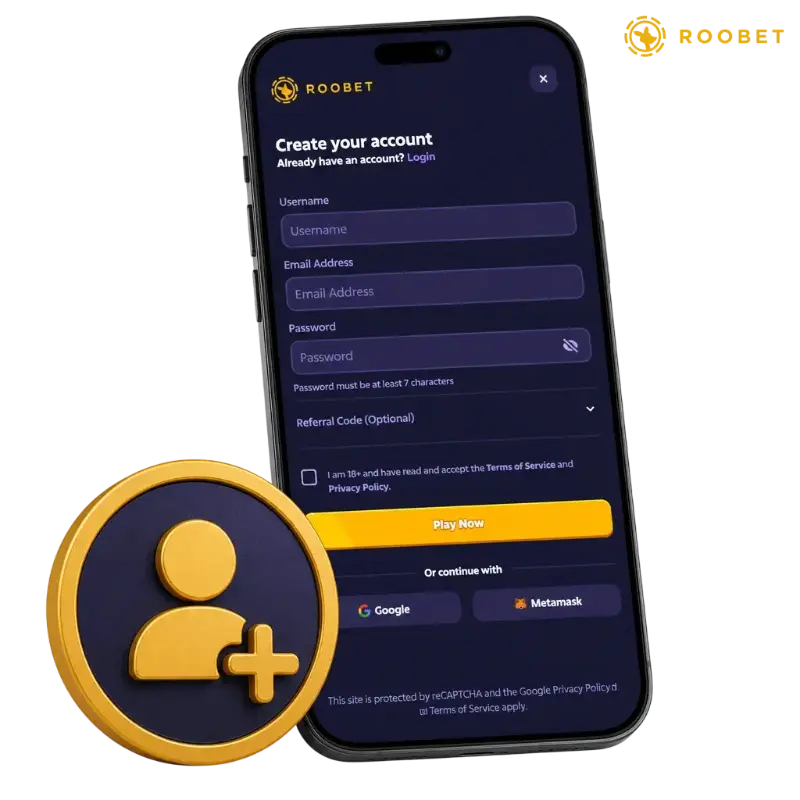
| Field | Rule | Required |
|---|---|---|
| Username | shown in chat and in the profile; the Terms forbid offensive names | yes |
| Email Address | used for login, password reset and account notices | yes |
| Password | at least 7 characters, as the form states | yes |
| Referral Code | optional, hidden until opened; one referral code per account | no |
| 18+ checkbox | confirms age and acceptance of the Terms of Service and the Privacy Policy | yes |
| Google or Metamask | "Or continue with" buttons under the form | alternative |
Section 4 of the Terms adds that a name, a date of birth, an address and an email belong to the account data; the operator asks for them through the profile and the verification page rather than in the first window. Sign-in through Google or Metamask skips the password field but not the Terms.
The Roobet guide opens with an overview of the catalogue, the cashier, the rewards and the licence; this chapter goes into one part of it in detail.
How to register, step by step
The procedure below follows the registration window as it appeared on 22 October 2026. The whole form fits one screen on desktop and on the mobile site; the referral field is the only part that stays folded.
- Press the yellow Register button in the header of the casino's home page.
- Enter a username, an email address and a password of 7 characters or more.
- Open the Referral Code field and paste a code if there is one; a referrer can be set only within 24 hours of sign-up.
- Tick the box "I am 18+ and have read and accept the Terms of Service and Privacy Policy".
- Press Play Now, or pick Google or Metamask under the form to sign in with that account instead.
After sign-up the Rewards program applies a sign-up rakeboost of 10% for 24 hours, as the Help Center article Rewards Explained describes; the chapter on the bonus mechanics covers rakeback and the Vault. Promo and referral codes are explained in the chapter on promo codes.
What the Terms require of an account
The Terms of Service set the conditions that apply from the first login. The minimum age is 18 or the local age of majority if that is higher (§8.1). One person may hold one account (§6); shared households, devices or IP addresses have to be reported, and the account cannot be transferred.
- one account per person; a second account leads to closure under §6;
- name, date of birth, address and email must be accurate and kept current (§4);
- documents can be requested at any time, and deposits or withdrawals wait until they are checked (§4.9, §10.5);
- an account with no login for 6 months becomes inactive; no inactivity fee is charged (§7);
- a chargeback on a card deposit is a breach and can leave the balance negative (§11);
- residents of the territories listed in §3.5 may not register.
The list of restricted territories is part of the Terms and is not reproduced here; the chapter on the licence and legal status links to the Terms.
Level 2 verification
The Help Center describes one named tier, Level 2 Verification. It asks for a passport, a driving licence or a government ID, front and back, uploaded at roobet.com/account-settings?page=verification. The compliance team reviews uploads daily and can request more documents after a manual review. Level 1 is not described, and no deposit threshold that triggers a check is published.
| Parameter | Value |
|---|---|
| Documents | passport, driving licence or government ID, both sides |
| Where | roobet.com/account-settings?page=verification |
| Review | daily by the compliance team; more documents possible |
| When requested | at any time; deposits and withdrawals limited until done |
| Needed for | tips between players; withdrawals on request |
| Processing time | not published |
| Screening | PEP and sanctions lists; reports to the Curaçao FIU |
- Open Account Settings and the Verification tab.
- Choose the document type: passport, driving licence or government ID.
- Upload a photo of the front and a photo of the back.
- Wait for the daily review; answer a request for extra documents through the same page.
A deposit can be made before verification, but the operator may hold a withdrawal until the documents clear. The chapter on withdrawals explains the 100% wagering rule that applies to every deposit.
Two-factor authentication and chat access
Two-factor authentication uses a time-based code from Authy or Google Authenticator. It is switched on in Account Security with the slider Enable Two-Factor Authentication, which shows a QR code and a secret; the app then returns a 30-second code. A recovery key is issued at setup and is the only way to remove 2FA without the app.
- 2FA protects the login and, where enabled, the confirmation of a withdrawal;
- the site chat opens only with 2FA on and $500 wagered over the lifetime of the account;
- chat rains require $250 wagered in the previous 48 hours;
- the setup steps and the recovery key are described in the chapter on login and 2FA.
Common registration mistakes
The table lists errors that follow from the Terms and the Help Center articles on accounts, with the consequence the operator names and the way to avoid each.
| Mistake | Consequence | Fix |
|---|---|---|
| A second account for the same person | Both accounts can be closed under §6 of the Terms; rewards and balances are at risk. | Keep one account; report a shared household or device to support. |
| A referral code added after 24 hours | The referrer is not credited; the code field no longer applies. | Open the Referral Code field during registration or within 24 hours. |
| A password shorter than 7 characters | The form refuses the entry. | Use 7 characters or more. |
| A date of birth or address that does not match the ID | Level 2 verification fails and withdrawals wait. | Enter the data exactly as the document shows it. |
| A card deposit reversed through the bank | The chargeback counts as a breach and the balance can go negative. | Contact support about a disputed payment instead. |
| No login for 6 months | The account becomes inactive; an empty inactive account may be closed. | Log in at least once in 6 months. |
Closing an account
The Help Center separates two cases. A new account with no deposits and no wagers is closed with the Close My Account button in the privacy settings. An account with activity is closed by email, with a cooldown built in.
- Write to cs@roobet.com with the subject "Account Deletion".
- Wait for the reply, which the Help Center puts at 24 to 48 hours.
- Wait through the 48-hour cooldown that follows the reply.
- Answer the confirmation email within 24 hours.
A time-out of 24 hours and self-exclusion from 1 day to permanent are separate tools in the account settings; the chapter on responsible gambling describes them, and the chapter on support has the contact channels.
The registration window takes four fields and an 18+ checkbox; Level 2 documents follow when the compliance team asks for them.
Frequently asked questions
Short answers on registration and verification.
What does the registration form ask for?
A username, an email address, a password of at least 7 characters and an optional referral code, plus an 18+ checkbox for the Terms and the Privacy Policy. Google and Metamask sign-in are the alternatives.
Does Roobet require KYC?
Documents can be requested at any time under the Terms. The named tier is Level 2: passport, driving licence or government ID, front and back, reviewed daily by the compliance team.
Can one person have two accounts?
No. Section 6 of the Terms allows one account per person; shared households, devices and IP addresses have to be reported to support.
Is there a sign-up bonus?
There is no welcome bonus. The Rewards program applies a 10% rakeboost for 24 hours after sign-up, and promo codes give small instant rewards; the chapter on the bonus mechanics has the schedule.
How is an account deleted?
By email to cs@roobet.com with the subject Account Deletion: reply within 24 to 48 hours, a 48-hour cooldown, then a confirmation to answer within 24 hours. New accounts without deposits use Close My Account in the privacy settings.
What is the minimum age?
18, or the local age of majority if that is higher, under §8.1 of the Terms. The 18+ checkbox in the form confirms it.